


Tired of paper clutter? Meet Manage Receipt, the smart AI receipts scanner app that digitally stores and organizes your receipts in seconds. Whether you’re managing small business expenses, taxes, or personal budgets, our app makes tracking fast, simple, and stress-free.
Shared expenses are common — team lunches, travel, office supplies, client meetings. But manual splitting leads to errors, disputes, and reimbursement delays. Manage Receipt removes that friction with intelligent split receipt management.
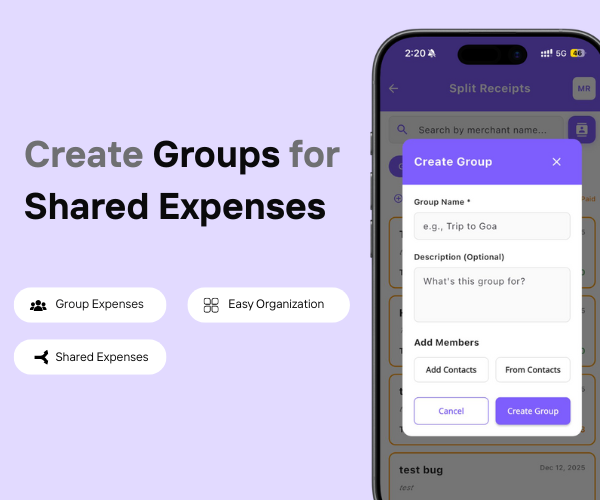
Organize shared expenses by creating groups for friends, roommates, trips, teams, or projects.
Create multiple groups for different purposes
Add or remove members anytime
Track group-wise spending clearly
Avoid mixing unrelated expenses
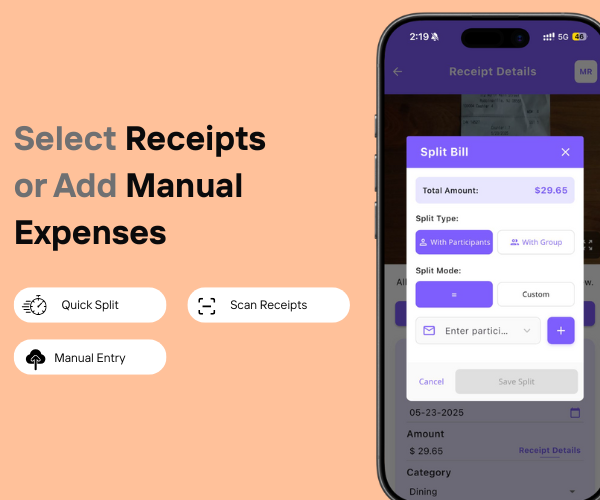
Choose existing receipts or manually add expenses to split instantly.
Select receipts directly from your vault
Add manual expenses when receipts aren’t available
Split scanned, uploaded, or manual entries
No dependency on paper receipts
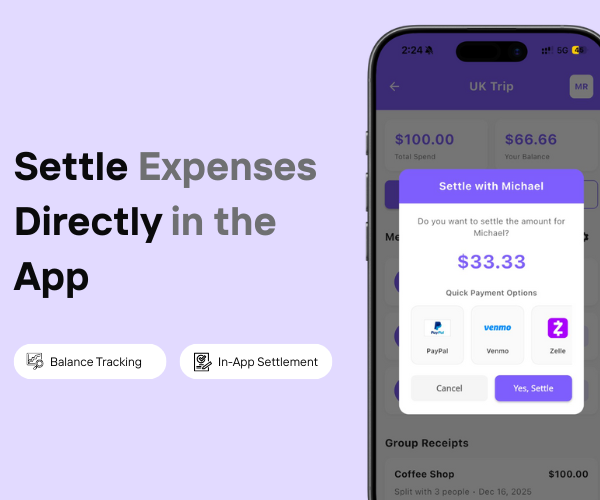
Track balances and mark expenses as settled directly inside the app.
Real-time balance tracking
See who owes whom instantly
Mark expenses as settled
Clean history of settlements

Choose existing receipts or manually add expenses to split instantly.
Select receipts directly from your vault
Add manual expenses when receipts aren’t available
Split scanned, uploaded, or manual entries
No dependency on paper receipts
When you split an expense with someone, the split appears in their app too — giving everyone a clear, shared view of the expense.
Split expenses visible to all involved contacts
Each person sees their share automatically
No screenshots or manual sharing needed
Keeps everyone aligned and informed
| Feature | Other Expense Apps | Manage Receipt |
|---|---|---|
| Split receipts by people | ✕ | ✓ |
| Split by percentage | ✕ | ✓ |
| Item-wise splitting | ✕ | ✓ |
| Receipt proof attached | ✕ | ✓ |
| Create Groups | ✕ | ✓ |
| Track who owes whom | ✕ | ✓ |
| Real-time split balance updates | ✕ | ✓ |
Why Splitting Receipts Works Better with Manage Receipt
Managing shared expenses becomes effortless with Manage Receipt. Instead of manually calculating who owes what, the app automatically splits a single receipt among multiple people with complete accuracy. Whether you want to split expenses equally, by percentage, by custom amounts, or item-wise, everything is handled instantly without errors.
Manage Receipt also ensures fairness by accurately splitting taxes, tips, and additional charges. Each split keeps the original receipt attached, giving everyone full visibility and trust. Even if changes are needed later, splits can be edited without re-uploading the receipt, making the entire process flexible and stress-free.
With real-time balance tracking, it’s always clear who owes whom, eliminating confusion, follow-ups, and disputes. The result is faster settlements, cleaner records, and a much smoother experience for any shared expense.
Why Split Receipts Feel Frustrating in Other Apps
Most expense apps aren’t designed specifically for splitting receipts. They rely heavily on manual calculations, forcing users to divide amounts themselves — often leading to rounding errors and confusion. Advanced split options like percentage-based or item-wise splitting are either limited or completely missing.
Taxes and extra charges are frequently ignored or split incorrectly, making expenses feel unfair. In many cases, receipt proof isn’t clearly linked to individual splits, which creates trust issues and reimbursement problems. Editing splits after submission is usually not possible, and balance tracking remains unclear, resulting in repeated follow-ups and disputes.
Instead of simplifying shared expenses, these limitations make the process time-consuming and frustrating.
Yes. Manage Receipt lets you split a single receipt between multiple people easily.
You can split receipts equally, by percentage, by custom amount, or item-wise.
Yes. Taxes, tips, and additional charges are distributed accurately across splits.
Absolutely. You can modify or adjust splits anytime after uploading.
Yes. Each split keeps the original receipt proof for clarity and transparency.
© 2025 Manage Receipt. All Rights Reserved.
