



Many small business owners see employee reimbursement as a hassle. However, it’s actually a critical part of running a fair workplace. Here’s why it matters:
Employees trust you with their money. When an employee buys supplies out of pocket, they’re temporarily loaning you money. Therefore, fast, fair employee reimbursement builds loyalty. Additionally, it shows respect for their contribution.
It affects cash flow and morale. Employees who have to wait months for employee reimbursement resent their job. Consequently, they worry about money. Moreover, they question whether you’ll actually pay them. Indeed, clear policies and fast payments prevent these problems.
It’s a legal requirement. In many jurisdictions, employers must reimburse employee expenses. Furthermore, delaying reimbursement can lead to legal issues. As a result, fair reimbursement keeps you compliant.
It affects business expenses. When tracking employee expenses properly, you capture deductions you might otherwise miss. Therefore, organized employee reimbursement records make tax time easier and more profitable.
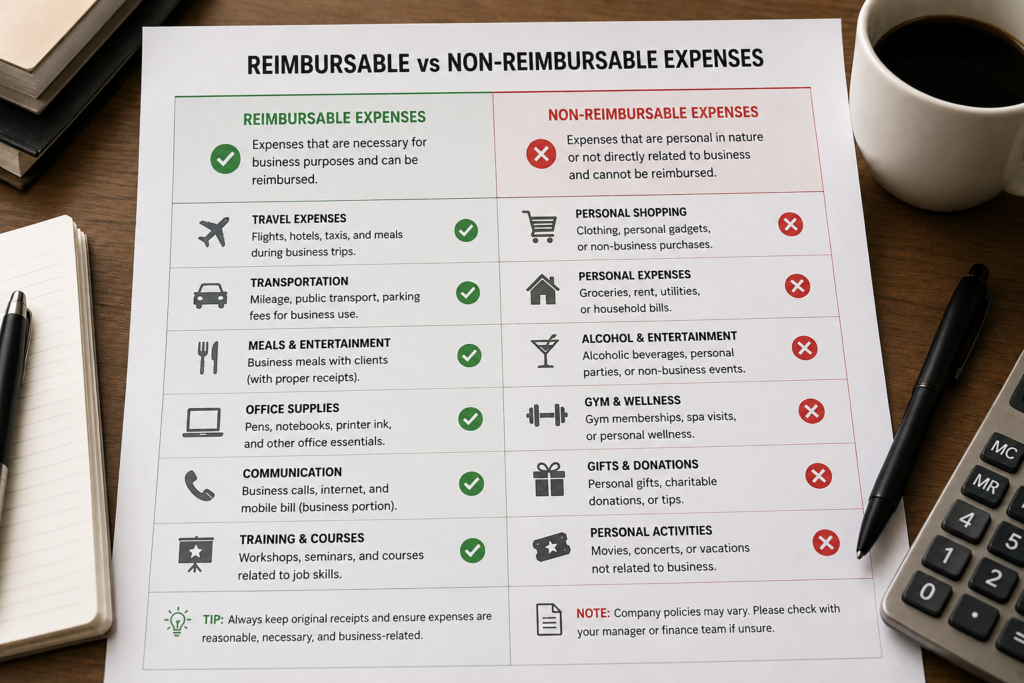
Not every employee expense is reimbursable. Clear guidelines prevent disputes and reduce unnecessary claims. When you define what qualifies for employee reimbursement, disputes disappear.
Always Reimburse These Business Expenses:
Never Reimburse These Personal Expenses:
Use Judgment on These Gray Areas:
Document your employee reimbursement policy in writing. Share it with all employees. Refer to it when questions arise. This prevents disputes and protects your business.

Clear policies are useless without organized systems. Importantly, you need a way to collect, track, and store employee expense receipts reliably.
Require receipts for all reimbursements. No receipt, no reimbursement. However, this simple rule prevents fraud. Additionally, it keeps everyone honest. For very small expenses (under $25), you might allow receipt-free reimbursement with notes.
Use a centralized system. Don’t accept random email receipts or lost paper slips. Instead, create a system where employees submit all expense receipts in one place. Consequently, nothing gets lost.
Collect receipts immediately. Encourage employees to photograph receipts the same day. Why? Waiting weeks means receipts fade and details get fuzzy. Therefore, same-day submission is best practice.
Require details, not just the receipt. A receipt shows the total. However, you also need context. Specifically, include the business purpose, employee name, date, and what was purchased.
Store everything digitally. Paper receipts fade. In contrast, digital copies last forever. Moreover, digital storage eliminates lost receipts completely.

Policies prevent disputes. When everyone knows the rules for employee reimbursement, the process is smooth and fair for everyone involved.
Your Employee Reimbursement Policy Should Cover:
Employees who incur business expenses are eligible for employee reimbursement. All employee reimbursement requires an itemized receipt. Receipts must be submitted within 30 days of the expense. Employee reimbursement is processed within 5 business days of approval. Expenses over $100 require manager pre-approval. Questions about reimbursability should be directed to HR before spending personal money.
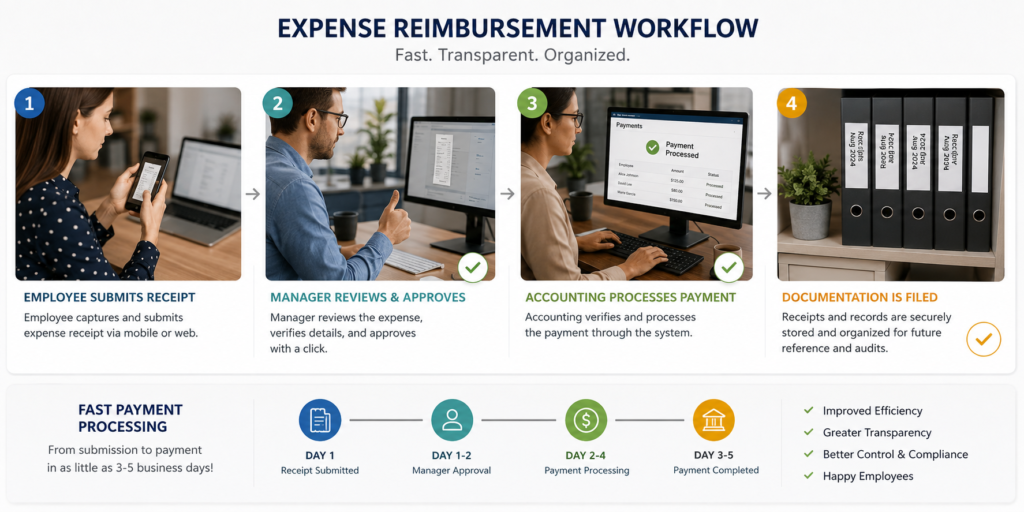
Process matters in employee reimbursement. A clear, efficient process gets employees paid quickly. Additionally, it keeps records organized.
Step 1: Employee submits expense claim. Employee collects receipts and documents. Importantly, they include receipt, date, amount, and business purpose. Furthermore, they submit to manager or designated person. Notably, submission should be timely (within 30 days).
Step 2: Manager reviews and approves. Manager checks several things: receipt is valid, expense is reimbursable, amount is reasonable. Therefore, they approve or request more information. Consequently, this step prevents fraud.
Step 3: HR or accounting processes reimbursement. Once approved, process payment immediately. This could be a check, direct deposit, or company card refund. Why? Fast payment shows respect. As a result, morale stays high.
Step 4: Record and store documentation. File the receipt, approval email, and reimbursement record together. Moreover, store digitally. Additionally, link everything so you can find it during audits.
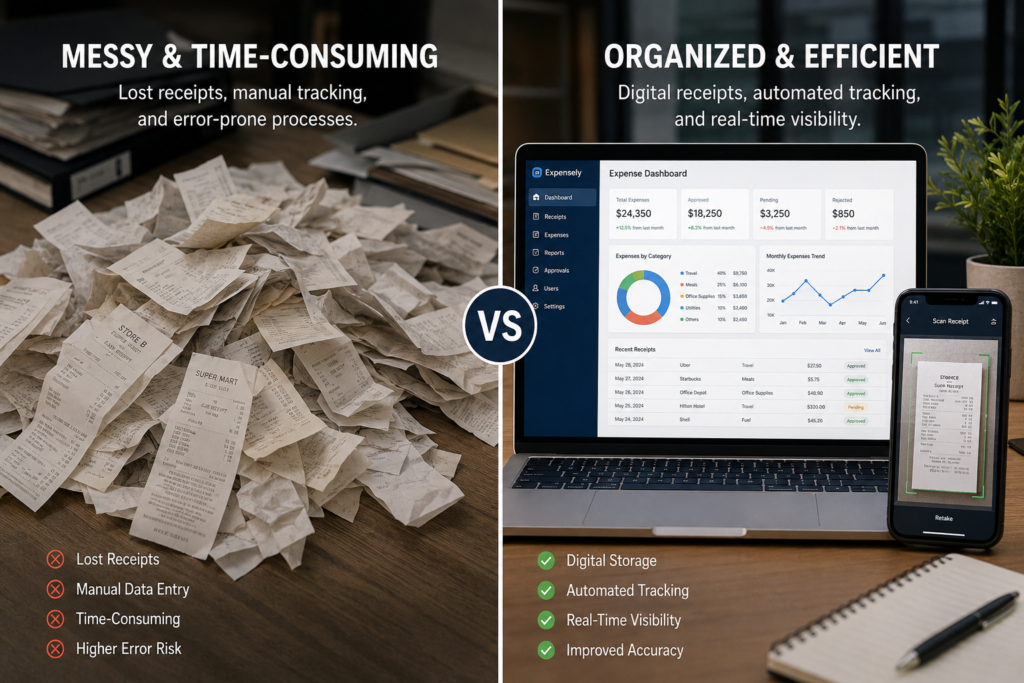
Paper systems fail. Digital tracking is faster, more reliable, and easier to audit for employee reimbursement management.
What to Track for Employee Reimbursement:
Benefits of Digital Tracking for Employee Reimbursement:
Apps that make employee reimbursement tracking easier include specialized expense management software and receipt scanning applications. However, even simple spreadsheets work if organized properly.

Employee reimbursement creates predictable problems. Here’s how to solve them and keep the process running smoothly.
Problem 1: Employees Forget to Submit Receipts
Set a deadline (within 30 days). After that, no employee reimbursement. This creates accountability. Send reminders before the deadline. Consistent deadlines make employee reimbursement predictable.
Problem 2: Receipts Are Missing or Damaged
Photograph receipts immediately. Use a digital receipt app for employee reimbursement. Digital copies are permanent and never fade like paper receipts do.
Problem 3: You’re Not Sure If an Expense Is Reimbursable
Check your written policy first. If it’s unclear, ask HR or management. Document the decision for future employee reimbursement discussions. Consistency matters.
Problem 4: Employee Reimbursement Takes Too Long
Set a timeline (employee reimbursement within 5 business days of approval). Communicate this clearly. Stick to it. Fast employee reimbursement shows respect.
Problem 5: Expenses Seem Too High
Compare to market rates and historical patterns. If an expense is unusually high, ask for clarification before approving. Coach the employee about cost-effective options for future employee reimbursement requests.
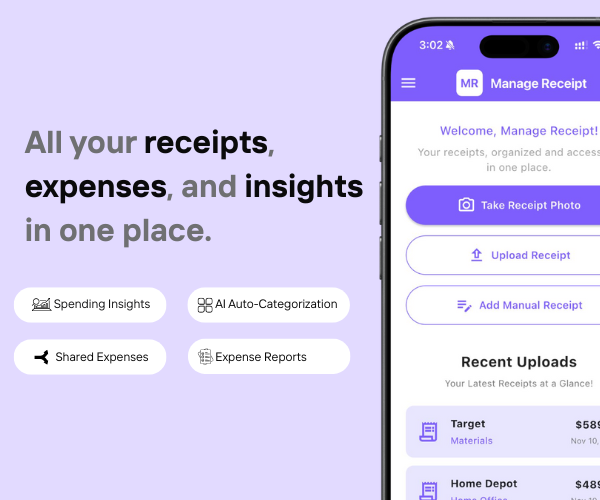
Going paperless sounds simple in theory — but the reality is that receipts come from everywhere: paper slips, email confirmations, SMS messages, and in-app purchases. Keeping all of that organized manually is where most people give up. That is exactly the problem Manage Receipt is built to solve.
Manage Receipt helps bridge that gap by ensuring every transaction is captured, stored, and ready the moment you need it.
With Manage Receipt, you can:
Scan paper receipts instantly using your phone camera — no scanner needed
Capture email receipts automatically from your inbox
Store everything in one secure, searchable place
Organize by category, date, or merchant with AI auto-categorization
Generate expense reports in seconds — ready for tax filing or reimbursement
Access every receipt from any device, anywhere in the world
The biggest advantage of using Manage Receipt isn’t just the time you save. It’s the receipts you stop losing — because every transaction is captured, stored, and ready the moment you need it.
Try Manage Receipt free today — available on iOS and Android. No credit card required.
Click Here to know more about how Manage Receipt helps small businesses.

Employee reimbursement is not complicated. However, it requires clear policies, organized systems, and timely payment for success.
When you get it right, employees trust you. They feel valued. They’re willing to spend their own money when needed because they know you’ll reimburse them quickly and fairly.
Start with a written employee reimbursement policy. Build a tracking system. Process reimbursements promptly. Your team will notice the difference immediately.

Every tool on this list helps you run your business better. But none of them matter if your financial records are a mess.
Before you invest in project management software, marketing tools, or e-commerce platforms — make sure your expense tracking is airtight. Every purchase you make for your business needs to be documented, categorised, and stored correctly. Not just for tax season, but for understanding whether your business is actually profitable.
That is exactly what ManageReceipt is built for. Scan a receipt in seconds, add the business purpose, and it is stored, backed up, and export-ready. No shoebox of crumpled paper. No scrambling at tax time.
Download ManageReceipt Free — Start Tracking Expenses Today
iOS & Android | managereceipt.com


© 2025 Manage Receipt. All Rights Reserved.
