One app for receipts, reports and bills.
See all featuresGet the mobile app
Available on iPhone, Android and Web
Track every bill in one place and get reminded before it's due. Rent, utilities, subscriptions and vendor invoices, all on one simple schedule.
Works on web, iPhone and Android

Before and after
Most late fees don't happen because the money isn't there. They happen because the date slipped. Here's what changes when every bill has a reminder.
How it works
Type in the bill details, or turn any scanned receipt into a reminder. The merchant, amount and date fill in from the receipt.
Choose when the bill is due and how often it comes back: daily, weekly, monthly, quarterly or yearly.
Get a push notification or email before the due date. Pay the way you always do, and the next reminder is already scheduled.
Features
Everything you need to stay ahead of due dates, without another spreadsheet to maintain.
Set up rent, internet, phone plans and software subscriptions once. Choose daily, weekly, monthly, quarterly or yearly, and Manage Receipt repeats the reminder every cycle.
Pick how early you want a heads-up for each bill: on the due date, 1 to 3 days before, 1 week before or 2 weeks before. Turn push notifications and email reminders on or off per bill.
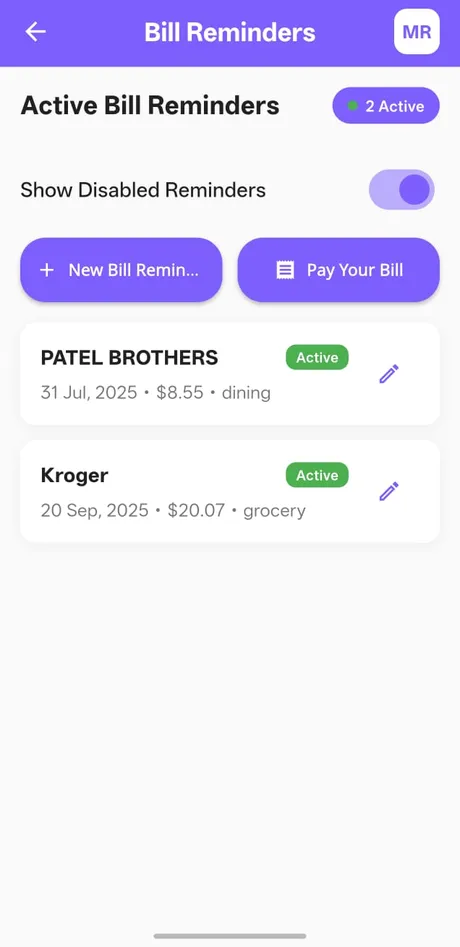
Always know when your bills are due. See every active reminder in one list with its due date, amount and bill type. Your dashboard shows what's due this week, and you can pause a reminder anytime and turn it back on later.
Some due dates aren’t bills. Store your insurance policy, lease or business license in Doc Wallet and set a renewal reminder on it, so nothing expires without warning.
Already scanned last month's bill? Create a reminder straight from that receipt. Your bills and your proof of payment live in the same app, ready if a vendor or landlord ever asks.
Bill types
Use Manage Receipt as an expense tracker with bill reminders for every regular payment in your life or business.
Monthly rent or mortgage, set once and repeated.
Electricity, water, gas, internet and phone.
Streaming, software and memberships, flagged before they renew.
Card statements, loan payments and EMIs, so you avoid interest and late fees.
Auto, home, health and business premiums, monthly or yearly.
Supplier and contractor payments on net-30 or net-60 terms.
Quarterly estimated tax payments and annual filing dates.
Licenses, leases and policies stored in Doc Wallet, with a reminder before they expire.
Who it's for
From household bills to business payables and client filing dates, one app keeps every due date on schedule.
For personal use
Whether you manage bills on your own, as a couple or for the whole home, Manage Receipt shows what is already paid and what is still due this month. Every bill gets its own push or email reminder, recurring payments repeat on their own, and rent, utilities and subscriptions sit together in one upcoming list. No spreadsheets, no sticky notes and no surprise late fees.
For business
Small businesses deal with more due dates than most households: supplier invoices, software seats, equipment leases and license renewals. As a business bill reminder app, Manage Receipt keeps vendor dues on one schedule and reminds you before quarterly estimated tax dates (April, June, September and January). Since your business receipts and expenses already live in the same app, payment proof is ready when it's time to build an expense report or hand records to your CPA.
For accountants
Accountants and bookkeepers track deadlines for many clients, not just one business. Add each client's filing dates, payroll tax deposits and year-end forms like 1099s as reminders in Manage Receipt, name them by client and get notified up to two weeks ahead. With receipts saved next to each payment, month-end reconciliation and client questions take minutes instead of a search through bank statements.
Web and mobile
Get reminders on your phone wherever you are, then review everything on a bigger screen when you sit down to pay.
Scan bills, get due date notifications and mark bills paid from your phone.
Download on theApp StoreLog in from any computer to add and edit reminders, see what's due this week and manage all your receipts.
Get StartedOne account. Your receipts stay in sync.
Yes. Manage Receipt is a bill reminder app for iPhone, Android and the web. Add a bill with its due date and how often it repeats, and you get a push notification or email before it's due, anywhere from the due date itself to 2 weeks ahead.
Look for an app that handles recurring bills, lets you choose when you're reminded and works on every device you use. Manage Receipt does all three on iPhone, Android and any computer through the web app, and keeps your bills and receipts in the same place.
Bill reminders are free on the Basic plan for iPhone and Android, which includes up to 100 receipts. Pro costs $4.99/month or $49.99/year and adds unlimited receipts, PDF and Excel reports and the web app. Enterprise has custom pricing for teams. See Pricing for full plan details.
Keep every bill in one place with its due date and a reminder. In Manage Receipt you add a bill once, set it to repeat and see everything that's coming up in a single list, so you stop checking emails, calendars and notes to know when your bills are due.
List every recurring bill with its amount and due date. Group bills by when they fall in the month. Set a reminder a few days before each due date. Pay on time and keep the receipt. Manage Receipt covers the list, the reminders and the receipts in one app.
Yes. Add a bill once, choose how often it repeats (daily, weekly, monthly, quarterly or yearly) and Manage Receipt reminds you every cycle.
You choose the timing for each bill: on the due date, 1, 2 or 3 days before, 1 week before or 2 weeks before. Reminders come as push notifications, email or both.
No. Manage Receipt doesn't move money or pay bills on your behalf. It reminds you before each due date, and you pay through your bank, card or the biller's site as usual.
Yes. Add streaming, software and membership subscriptions as recurring bills, and you'll get a reminder before each renewal so you can keep or cancel it in time.
Yes. Log in at managereceipt.com from any computer to set bill reminders and manage your receipts, expense reports and tax reports. The iPhone and Android apps use the same account, so your bills and receipts stay in sync.
Your data is encrypted in transit and at rest and stored on secure cloud servers. Read more on our Security and Trust page.
More features
Add your first bill in under a minute and let Manage Receipt handle the remembering.
Works on web, iPhone and Android
Features
Industries
Resources
© 2026 Manage Receipt. All Rights Reserved. Designed by Butterfly Technology LLC.